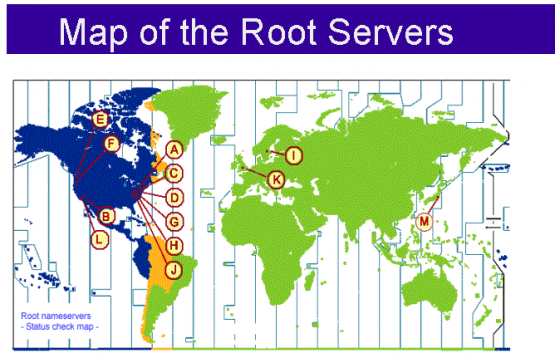
OPENING QUESTIONS: The actual system employed by the Root Servers involves the DNS (Domain Name Servers):
 |
 |
What can you infer from those graphics about the nature of DNS?
The images above are taken from:
- https://www.cloudflare.com/learning/dns/what-is-dns/
- https://www.cloudflare.com/learning/dns/glossary/dns-root-server/
OBJECTIVES: I will be able to diagram how an internet packet is assembled during today's class.
CALENDAR:
Your Internet Streaming Project WAS Due LAST FRIDAY. Get those in!
WORDS FOR TODAY:
- binary: "A way of representing information using only two options"
- bit: A contraction of "Binary Digit"; the single unit of information in a computer, typically represented as a 0 or 1
- bandwidth: Transmission capacity measure by bit rate
- bit rate: (sometimes written bitrate) the number of bits that are conveyed or processed per unit of time. e.g. 8 bits/sec.
- latency: Time it takes for a bit to travel from its sender to its receiver.
- protocol: A set of rules governing the exchange or transmission of data between devices
- router: "Traffic Cop"
- packets: Discreet blocks of internet traffic sent between computers & servers as directed by routers.
- Port - one of 64,000 'doors' available to access your computer from the outside world
- Server - A computer designed to process specific data requests from users
- TCP - Transfer Control Protocol - Provides connection information to a specific port on a specific server on the interweb
- IP - Internet Protocol - Provides Name/Address information to a specific server on the interweb
- HTTP: Hyper Text Transfer Protocol
- Root Servers (Manage the DNS system)
- DNS ("Domain Name Server" manages a lookup table of domain names and IP numbers)
WORK O' THE DAY:
Please test the words o' the day with your team
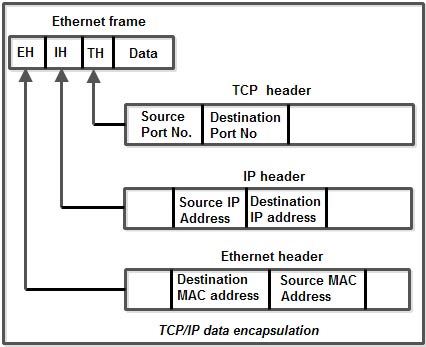
Among its other duties of defining how Transmission occurs from your computer to servers across the interweb, TCP also assembles packets.
Suggest why that task is done by TCP?
Outline the steps required to create a packet of information sent from your computer to a server on the web.
Please spend a few moments researching how TCP creates an internet packet now and be prepared to share your findings with the class.
I have added a bit more information to our networking 'flow chart'. Please review that now:
The Basics:
- The root server responds with the quick note saying basically "Yes, that site exists and here's the IP Address for the site" using IP protocols
- The data transmitted according to the IP Protocols MUST contain the following information:
- Then your browser software sends a quick note to the server(s) at that IP address saying something like "Hello, I'd like to talk to Mr W's web site. Since I want to talk to your web pages I'd like to use port #80, is that ok?" and then that server responds by saying "Yes, please knock on door #80 since that is the standard door for all web traffic on all web servers everywhere on the interweb" using TCP protocols.
- The TCP data in your packet must be formatted like this:
- Your browser then sends a note to port 80 on the web server at that IP address saying "Hi, I'd like to see the hypertext information on Mr W's Web site". The web server responds by sending the web page (hypertext) characters for that home page formatted using the appropriate HTTP protocols.
- The Application Layer is formatted to contain data that looks like this: (*yikes*)
- Your browser reads all that hypertext. Your browser finds that data is well formatted hypertext markup language and begins constructing the page using your browser software.
- Your browser notices there are pictures on the server homepage and sends an additional request to port 80 on the web server at the IP address with a request to send that picture along.
- The web server software monitoring port 80 at that IP address then sends that picture back to your browser inside the application layer. Your browser then finishes populating that entire web page by adding the picture into the code at the correct location.
- Done!
Right?
No!
YIKES....
As with many things technical on the interweb, there is a lot more to it...
Let's take a look at THIS sorting activity. I'll print that out and have you cut into strips and make a first go and sorting the bits.
Then I'll have you sort out the parts that don't make too much sense and we'll do a wee bit of research on those.
Then we'll scramble everything and try again (time permitting!)